今天给大家分享一款自用的子比主题文章详情页,很早之前就想发出来,因为没有适配,看很多人需要所以我抓紧适配了一下,话不多说直接开始,喜欢的自行部署!

代码部署
定位:/wp-content/themes/zibll/inc/functions/zib-single.php文件,我们找到下面的函数,如下图
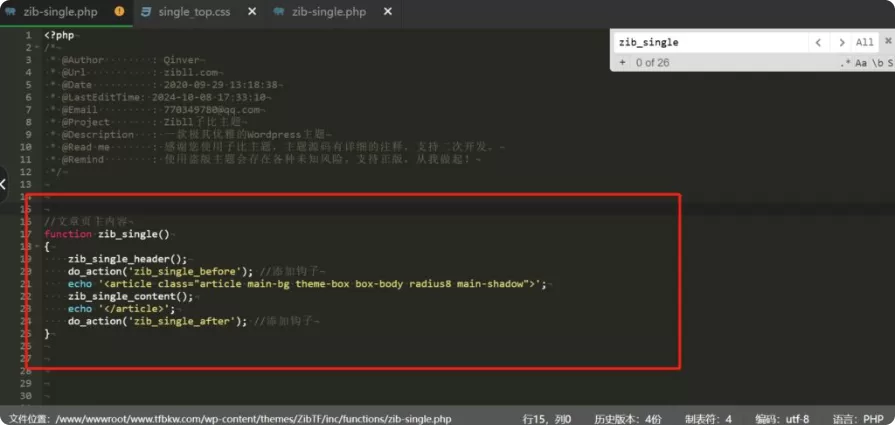
function zib_single() {
    zib_single_header();
    do_action('zib_single_before');
    wp_enqueue_style('tengfei-single-top-style', '/wp-content/themes/zibll/css/xkzhi/tab.css', array(), '1.0.0');
    echo '<article class="article main-bg theme-box box-body radius8 main-shadow">';

    echo '
    <div class="tabs">
        <div class="tab active" data-target="#postsposcontent"><svg class="icon" aria-hidden="true"><use xlink:href="#icon-view" rel="external nofollow"  rel="external nofollow" ></use></svg> 详情</div>
        <div class="tab" data-target="#commentscontent"><svg class="icon" aria-hidden="true"><use xlink:href="#icon-comment" rel="external nofollow"  rel="external nofollow" ></use></svg> 评论</div>
        <div class="tab" data-target="#accordionhelpcontent"><svg class="icon" aria-hidden="true"><use xlink:href="#icon-like" rel="external nofollow"  rel="external nofollow" ></use></svg> 问答</div>
    </div>';

    echo '<div id="postsposcontent" style="display: block;">';
    zib_single_box_header();
    zib_single_box_content();
    echo '</div>';

    echo '<div id="commentscontent" style="display: none;">';

    if (_pz('post_authordesc_s') && !is_single()) {
        $args = array(
            'user_id'     => get_the_author_meta('ID'),
            'show_button' => false,
            'show_img_bg' => false,
            'class'       => 'author',
        );
        zib_get_user_card_box($args, true);
    }

    echo '</div>';

    echo '
    <div id="accordionhelpcontent" class="tab2_content" style="display: none;">
        <div class="wp-block-zibllblock-collapse">';

    $faq_list = [
        '如何下载资源?' => '您可以通过搜索或浏览分类列表来寻觅您期望下载的资源。随后,点击资源介绍页右侧的下载链接按钮,依据提示信息进行操作即可。',
        '是否需要充值才能下载?' => '大部分资源可积分免费下载,部分资源须付费才能下载。',
        '下载的资源是否有版权?' => '本网站提供的下载资源均为网络搜集,仅供个人学习和交流使用。对于版权问题,请用户自行判断并承担相应责任。',
        '如何加入QQ群?' => '搜索QQ群917046597',
    ];

    $i = 1;
    foreach ($faq_list as $title => $content) {
        echo '<div class="panel" data-theme="panel" data-isshow="true">
                <div class="panel-heading collapsed" href="#collapse_'.$i.'" rel="external nofollow"  rel="external nofollow"  data-toggle="collapse" aria-expanded="false">
                    <i class="fa fa-plus"></i>
                    <strong class="biaoti">'.$title.'</strong>
                </div>
                <div class="collapse" id="collapse_'.$i.'">
                    <div class="panel-body">
                        <p>'.$content.'</p>
                    </div>
                </div>
              </div>';
        $i++;
    }

    echo '</div></div>';

    echo '
    <script>
        document.addEventListener("DOMContentLoaded", function () {
            document.querySelectorAll(".tab").forEach(tab => {
                tab.addEventListener("click", function () {
                    document.querySelectorAll(".tab").forEach(t => t.classList.remove("active"));
                    document.querySelectorAll("#postsposcontent, #commentscontent, #accordionhelpcontent").forEach(c => c.style.display = "none");

                    this.classList.add("active");
                    document.querySelector(this.dataset.target).style.display = "block";
                });
            });

            document.querySelectorAll(".panel-heading").forEach(panel => {
                panel.addEventListener("click", function () {
                    let targetId = panel.getAttribute("href");
                    let target = document.querySelector(targetId);
                    if (!target) return;

                    let icon = panel.querySelector(".fa");

                    let isCollapsed = target.classList.contains("in");

                    document.querySelectorAll(".collapse").forEach(c => {
                        c.classList.remove("in");
                        c.previousElementSibling.classList.add("collapsed");
                        c.previousElementSibling.querySelector(".fa").style.transform = "rotate(-45deg)";
                    });

                    if (!isCollapsed) {
                        target.classList.add("in");
                        panel.classList.remove("collapsed");
                        icon.style.transform = "rotate(0deg)";
                    }
                });
            });
        });
    </script>';

    echo '</article>';
    do_action('zib_single_after');
}
把此文件放根目录解压