介绍
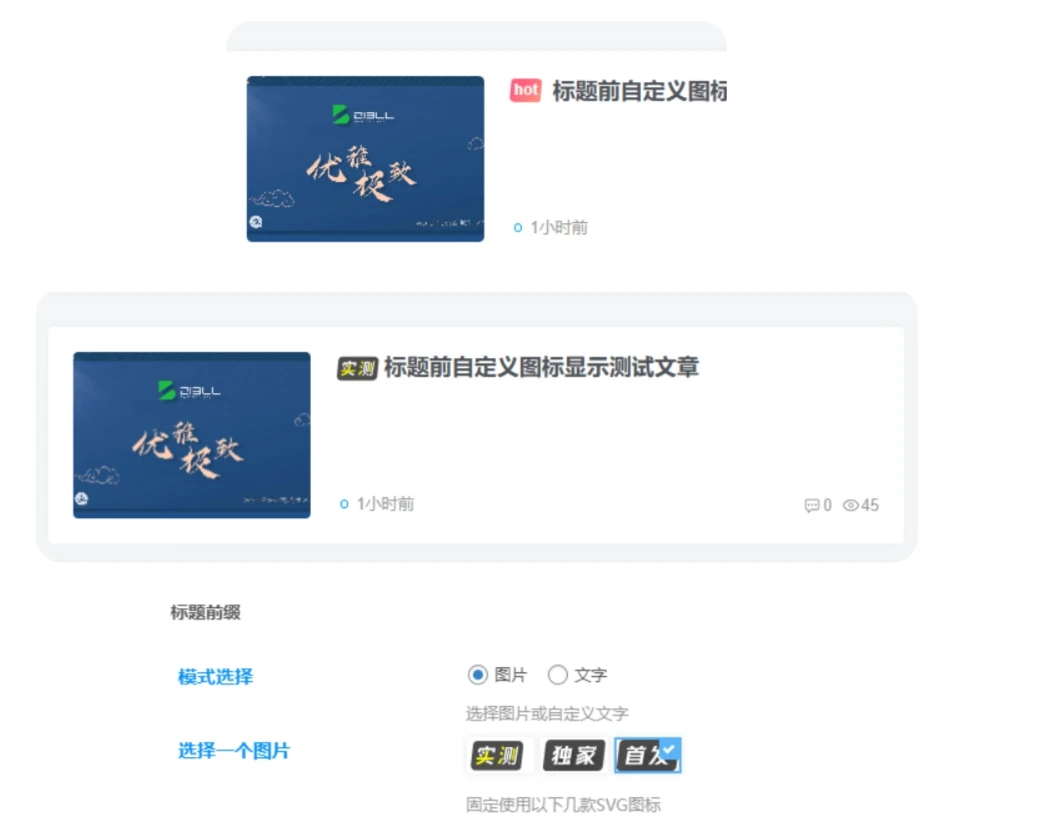
发布文章时自定义文章前缀是一个非常实用的功能,它允许作者或编辑在文章标题前添加特定的文字或图像标签。这样的功能对于区分文章类型、提高文章的可识别度或者增加视觉吸引力都非常有帮助。接下来,我们将探讨如何使用这个功能以及它的主要特点。在优知新的网站看到的,但是修改主题文件就passl了,然后就有了下面的功能
图片
代码
代码放在下func.php(没有创建一个)
 CSF::createMetabox('DearLicy_titles', array(
    'title'     => '标题前缀',
    'post_type' => 'post',
    'context'   => 'advanced',
    'data_type' => 'unserialize',
    'priority'  => 'high',
));

CSF::createSection( 'DearLicy_titles', array(
    'fields' => array(
        array(
            'id'       => 'titles_moshi',
            'type'     => 'radio',
            'title'    => '模式选择',
            'desc'     => '选择图片或自定义文字',
            'inline'   => true,
            'options'  => array(
                'img'   => '图片',
                'text'  => '文字',
            ),
            'default' => 'img',  // 默认选择图片模式
        ),
        array(
            'id'      => 'text',
            'type'    => 'text',
            'title'   => '文字模式',
            'desc'    => '建议两个字',
            'dependency' => array( 'titles_moshi', '==', 'text' ),  // 依赖关系:当模式选择为文字时显示
        ),
        array(
            'id'      => 'text_bg_color',
            'type'    => 'palette',
            'title'   => '背景颜色',
            'desc'    => '部分颜色带有文字颜色,其余默认白色',
            'class'   => 'compact skin-color',
            'default' => "jb-vip2",
            'options' => CFS_Module::zib_palette(array(), array('jb')),
            'dependency' => array( 'titles_moshi', '==', 'text' ),  // 依赖关系:当模式选择为文字时显示
        ),
        array(
            'id'      => 'img',
            'type'    => 'palette',
            'title'   => '选择一个图片',
            'desc'    => '固定使用以下几款SVG图标',
            'class'   => 'compact skin-color',
            'default' => "jb-vip2",
            'options' => DearLicy_Module::DearLicy_imgtitle(),
            'dependency' => array( 'titles_moshi', '==', 'img' ),  // 依赖关系:当模式选择为图片时显示
        ),
    ),
));

class DearLicy_Module
{
    public static function DearLicy_imgtitle($palette = array())
    {
            $palette = array_merge($palette, array(
                'shice'    => array('url(https://www.xkzhi.cn/zatu/shice.svg);width: 50px;'),
                'shoufa'    => array('url(https://www.xkzhi.cn/zatu/shoufa.svg);width: 50px;'),
                'dujia'    => array('url(https://www.xkzhi.cn/zatu/dujia.svg);width: 50px;'),
            ));
        return $palette;
    }

}

function apply_dearlicy_prefixes_to_title($title, $id = null) {
    // 只有在前端,并且非单个页面,才对标题进行更改
    if (!is_admin() && !is_single() && $id) {
        // 先获取meta box中的设置项
        $prefixes_setting = get_post_meta($id, 'titles_moshi', true);

        if($prefixes_setting == 'img') {
            $selected_img = get_post_meta($id, 'img', true);
            $img_url ='';
            switch ($selected_img) {
                case 'shice':
                    $img_url = 'https://www.xkzhi.cn/zatu/shice.svg';
                    break;
                case 'shoufa':
                    $img_url = 'https://www.xkzhi.cn/zatu/shoufa.svg';
                    break;
                case 'dujia':
                    $img_url = 'https://www.xkzhi.cn/zatu/dujia.svg';
                    break;
            }

            if(!empty($img_url)) {
                $title = "<img src='$img_url' alt='$img_url' style=' height: 20px; pointer-events: none;margin-right: 3px;'/>" . $title;
            }
        } else {
            // 对保存的文字前缀进行处理
            $prefix_text = get_post_meta($id, 'text', true);
            $prefix_bg_color = get_post_meta($id, 'text_bg_color', true);
            if (!empty($prefix_text)) {
                $title = "<span class='DearLicy_prefix ". esc_attr($prefix_bg_color) ."'>" . esc_html($prefix_text) . "</span> " . $title;
            }
        }
    }
    return $title;
}
add_filter('the_title', 'apply_dearlicy_prefixes_to_title', 10, 2);



66666